
You need a management platform that supports WordPress multisite backup if you’re managing multiple websites. Managing a single website alone is a huge task, let alone multiple websites.
Apart from occasional backup, each website requires core updates, theme updates, plugin updates, and performance optimization, among others. But with a management tool like WP Managify, agencies and freelancers can now manage and back up multiple WordPress sites effortlessly.
Manual backup is time-consuming and tedious. Most of the time, you may even forget to back up your website. This creates gaps in website protection and increases security risks. Hackers could strike before you create time from your busy schedule to back up your clients’ websites manually.
In this post, we explained how to back up multiple websites and shared tips to make managing multiple WordPress websites a breeze.
The Benefits of Managing Multiple Websites from One Dashboard
Have you ever managed multiple WordPress websites? It’s time-consuming and overwhelming. First, you have to log into the different websites, track updates, and manage users.
The website’s security is also a priority. Thus, you have to manage each website’s security vulnerabilities – all from different dashboards. Of course, you know you need to act fast when you spot security vulnerabilities on websites.
Here is how managing multiple WordPress websites with the right tool can make you more productive as an agency, freelance, or website owner.
Saves time and energy:
Logging in and switching between websites can be physically and mentally draining. You’ll spend more time and get fewer tasks done each day.
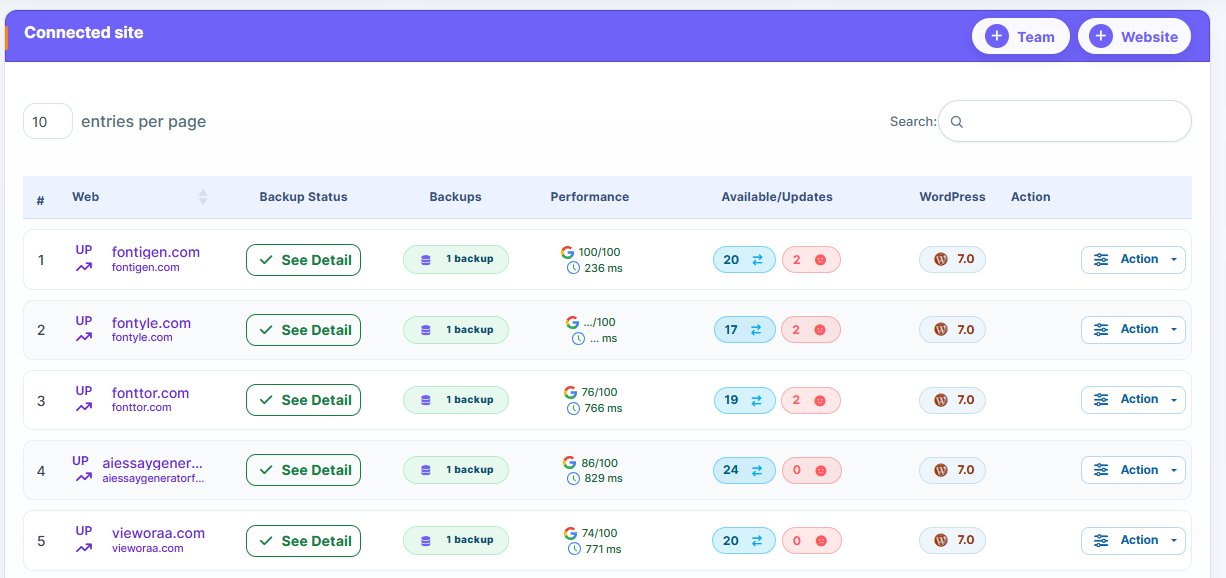
Managing multiple websites from a single dashboard (e.g., using WP Managify) can make your task much easier. You don’t need to log in to different websites.
From the management platform, you can track website updates, security issues, manage users, and more. This saves time and allows you to efficiently manage multiple websites.
Improve website security:
Security is a significant issue for WordPress websites. Forbes reports that in 48 hours, WordPress websites faced 1.6 million attacks.
Tracking security vulnerabilities across a single website can be daunting. It is worse for multiple websites.
A centralized dashboard like WP Managify’s helps you effortlessly meet the security needs of multiple websites.
The dashboard provides an overview of each website’s security vulnerabilities, helping you spot potential threats effortlessly. You can run malware scans for multiple websites, patch security issues, and protect all your websites from security threats.
Easy website maintenance:
It’s draining and time-consuming to manually run multiple websites’ plugins, themes, and core updates. Hackers can take advantage of loopholes in plugins, themes, and outdated WordPress when you delay updates.
Having a centralized dashboard makes maintaining multiple websites a breeze. You can update multiple websites’ plugins, themes, and WordPress core updates from one place.
From the dashboard, you can backup many WordPress sites, monitor uptime, run security scans, and troubleshoot issues to improve website security.
Monitor website performance effortlessly:
Managing multiple WordPress websites from a single dashboard makes it easier to track their performance.
You can track uptime, website speed, and other critical performance metrics, making it easier to respond promptly to issues. It helps you keep multiple websites operating smoothly, without a single drop in performance.
You Need A Platform That Can Backup Multiple WordPress Sites
If you’re an agency that manages WordPress websites for multiple clients, you’ll understand that backing up isn’t an option. It is essential for easy disaster recovery and legal protection. Clients will trust you more when you keep their websites running smoothly.
When you manually back up multiple WordPress websites, you’re risking your website security. Risks of this magnitude can cause a website to malfunction, leaving your once-happy clients unsatisfied.
You can reduce or eliminate errors and save time by automating backups and centralizing control. Backup multiple WordPress websites from a single dashboard.
A robust WordPress multisite backup platform gives agencies:
- Clean and predictable automation
- Reduce errors and improve the number of backups
- Agencies can scale without hiring more staff
- Restore multiple websites instantly
- Full visibility across client websites
- Simple onboarding of new clients’ websites
- Consistent backup and website maintenance policies for every client
- Speedy recovery when your website crashes, data loss, or corruption
Manual backup slows down your agency’s progress. You can’t manage clients’ websites efficiently.
With centralized automated WordPress multiple website backup, your workflow improves. You can even scale and generate more revenue while building a solid reputation.
How Freelancers and Agencies Backup Clients WordPress Sites
How do freelancers and agencies run WordPress multisite backup? There are two ways through which they offer this service:
Using WordPress multisite network backup:
The process here is simple. They use a built-in multisite backup system.
The system helps create a single hosting environment for the backup. Here, you will find diverse sub-websites – all from a single installation.
What do you need to backup a multisite network? Check them out below:
- Network-level protection
- Database-wide export
- Combined restoration
- File-wide backup
Pro Tip: Use this multisite backup strategy effectively when the client website lives within the same multisite network.
Now, let’s discuss the second WordPress multisite backup strategy.
Using centralized backup (For many independent websites)
Using platforms like WP Managify, agencies and freelancers can deliver efficient WordPress management services.
From the centralized dashboard, you can:
- Automate and trigger backup of multiple websites
- Add an unlimited number of websites for easy and effective management
- Schedule backup of multiple WordPress websites from one dashboard
- Have an overview of logs and the health of website data
- Restore WordPress website individually from one dashboard
- Monitor the uptime of multiple WordPress websites to administer the needed response during downtime
- Help agencies and freelancers generate a custom report for their clients.
The flexibility offered by WordPress management platforms like WP Managify is unmatched. Agencies managing multiple websites can leverage the tool to back up and manage hundreds of their clients’ websites.
Another benefit of using centralized management platforms like WP Managify is the ease of scaling. Agencies can scale effortlessly without hiring extra staff.
WordPress Multisite Backup (Backup Many WordPress Sites with WP Managify)
WP Managify is a complete agency-grade system designed to help agencies and freelancers backup client WordPress sites. It boasts an intuitive interface and makes backup a breeze.
Here is how to use this backup tool (WP Managify)
Step 1: Sign up for WP Managify:
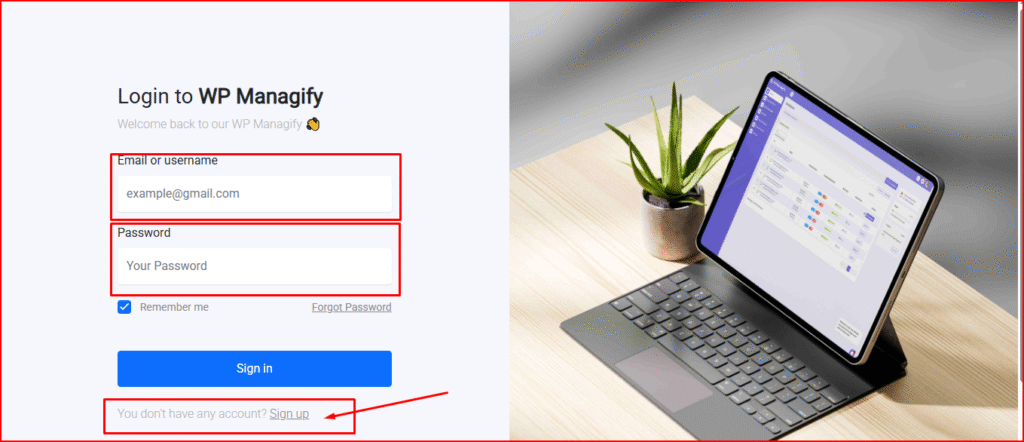
The first step is to create an account if you’re a new user.
Visit the WP Managify official website to create your account.
Account creation gives you access to a centralized dashboard where you can add more websites, backup monitor, and manage an unlimited number of WordPress websites with ease.
Pro Tip: Use a strong password to secure your WP Managify account. Combine numbers, letters, and special characters to make your password unpredictable.
Use a password you can easily remember. And avoid storing your password where anyone can access it. You should also not share your Managify account password unless you trust the person you want to grant access to your account.
Step 2: Connect WordPress websites to WP Managify:
The next step is onboarding. You need to add the websites you want to backup to WP Managify.
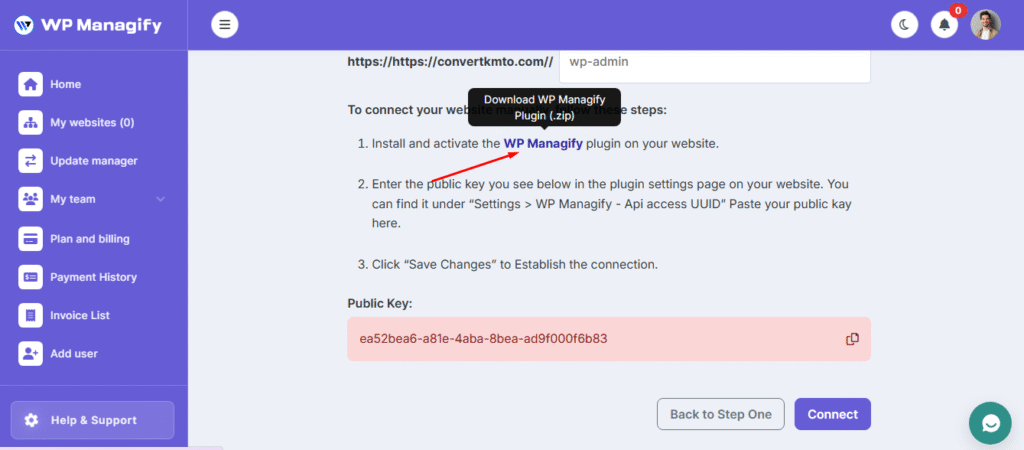
Download the backup plugin to your computer. The next step is to upload the plugin to your WordPress website.
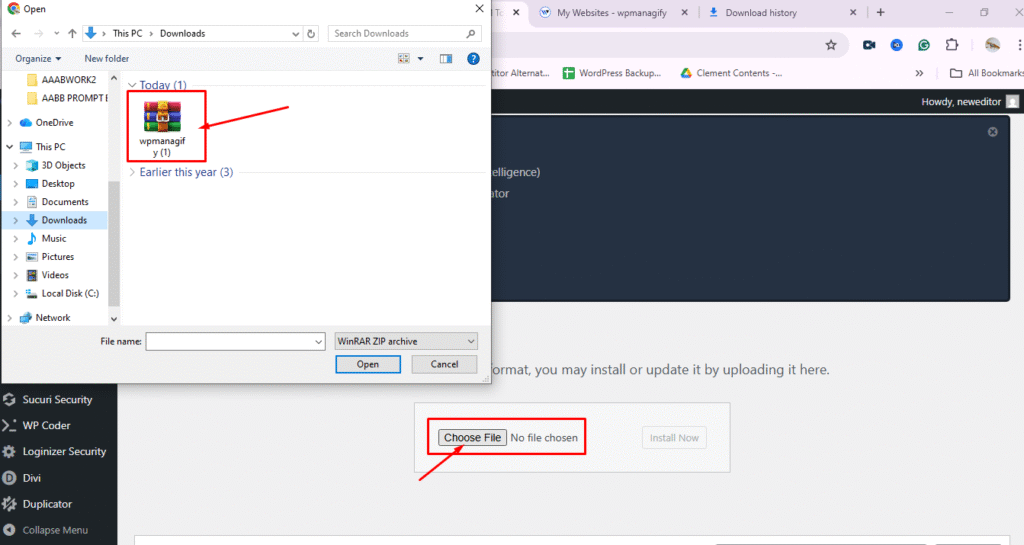
Click on “Choose file” to upload the plugin to your WordPress website.
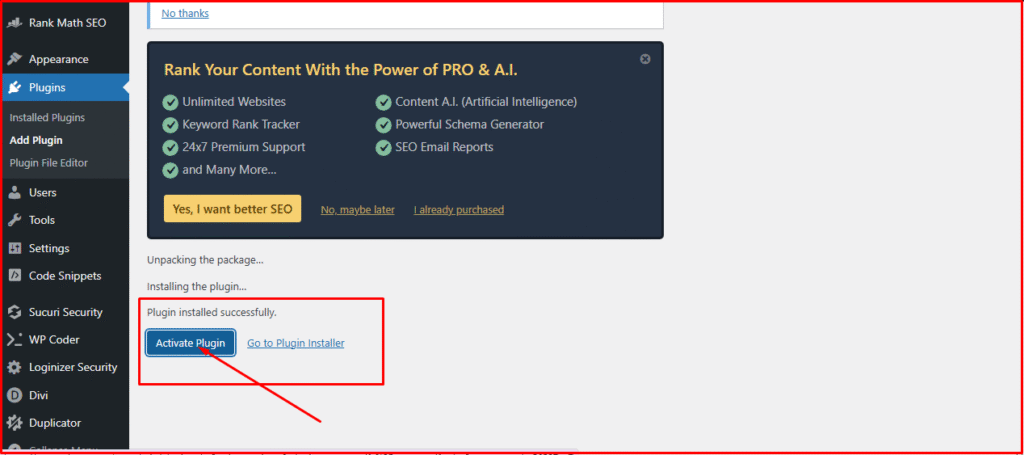
The idea is to connect your WordPress website with the WP Managify plugin. Once you finish installing, click “Activate Plugin.”
Your website and management platform become connected when you click “Activate Plugin.”
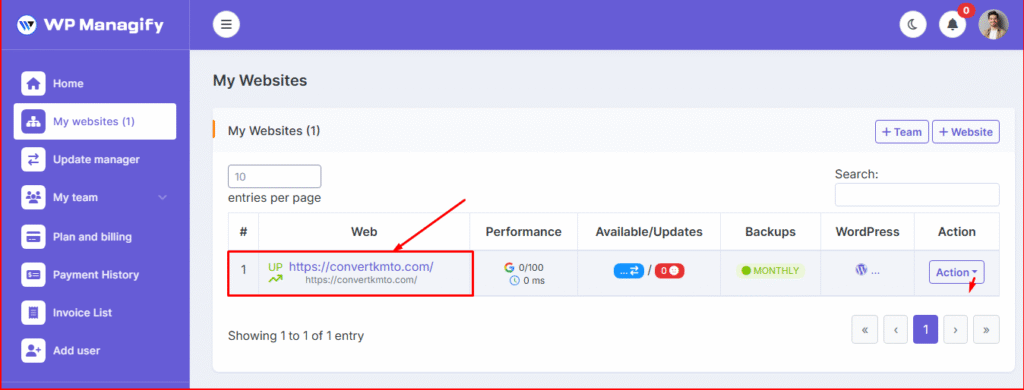
You have now successfully connected your WordPress website to the management platform.
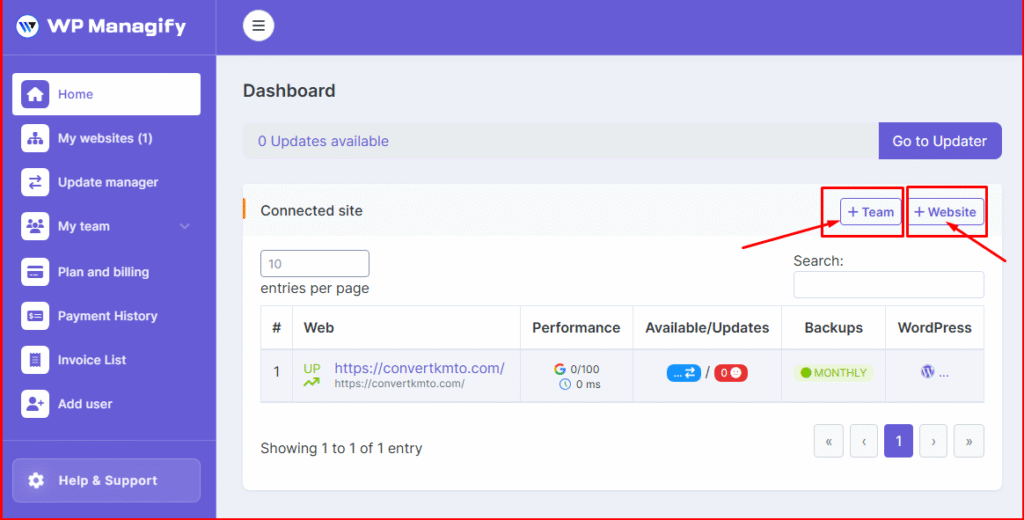
You can bring more team members on board. Just click on “Add Team” to add new members.
An effective centralized backup dashboard should make adding more websites a breeze. That is what this platform offers.
To backup multiple WordPress sites, click “Add Website.”
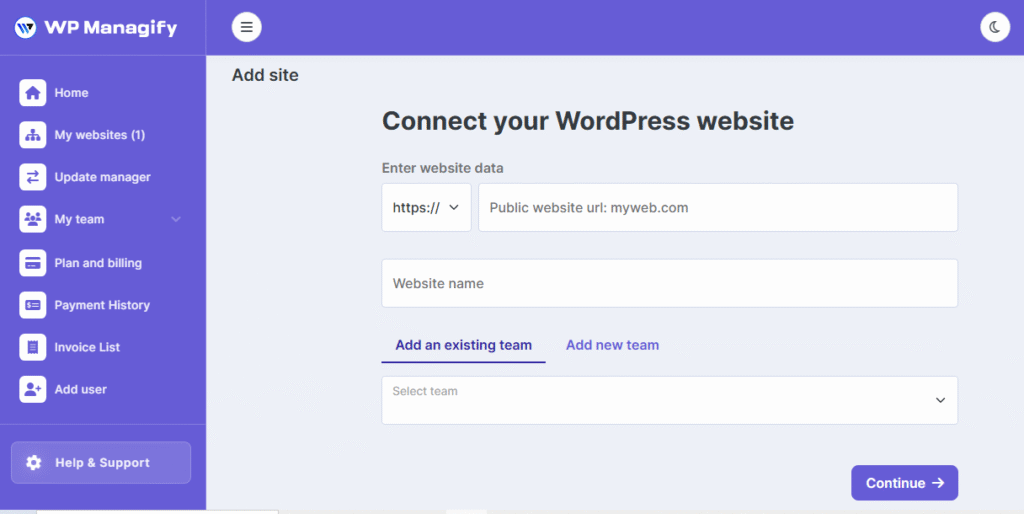
Now you can add a new website with ease. Provide the website data and name to proceed.
A robust onboarding workflow is essential for managing multiple WordPress websites. It will help you avoid future chaos and prevent you from missing backups.
Once you successfully connect your WordPress website to the WP Managify platform, follow the next step to get things rolling.
Step 3: Choose backup schedule for each WordPress site:
Schedules are crucial when backing up any number of WordPress websites. It will determine the level of protection each website under your care has.
Follow these backup schedule settings:
- Active WordPress sites – Use the daily backup schedule
- Low-activity websites – Use the weekly backup schedule
- eCommerce websites – Use the hourly backup schedule
- Archived websites – Use the monthly backup schedule
- Enterprise clients – Use custom schedules
The benefit of using a WordPress multisite backup platform like WP Managify is that it allows independent scheduling. Not all websites have equal needs. While some require daily schedules, others require hourly, monthly, weekly, and so on.
Step 4: Choose backup type for each website:
Every website has its needs. Keep this in mind when managing multiple websites for clients, or even your own.
Match each website to its backup type. Here is a strategy you should consider.
Full website backup:
Includes:
- Files
- Plugins
- Uploads
- Themes
- Database
You can use this backup type for most of your clients’ websites.
Database-only backup:
Includes:
- Orders
- Pages
- Posts
- Users
- Settings
You can use this backup type when managing high-activity online stores for clients.
Incremental backup:
This backup type includes only the changed files. You can use it to reduce server loads for larger websites.
Off-site cloud backup
You store the backup externally. Help avoid server-wide failures.
Step 5: Test backup restore occasionally:
Your backup is worthless if it doesn’t restore. It is as good as not backing up the website.
Agencies managing multiple websites must develop the habit of testing backup restores monthly. This will help them understand the state of their backups.
Test checklist:
- Restore the backup to a staging website
- Test the login
- Test the forms
- Verify plugin activation
- Verify theme integrity
- Check menu structure
- Confirm the accuracy of your database
Mistakes Agencies Must Avoid When Backing Up Many WordPress Websites
Agencies or freelancers must avoid mistakes during backup. They can damage your reputation and cost you clients.
Let’s discuss the different mistakes to avoid:
- You should not rely on hosting backups. It’s a huge gamble that can cost you dearly.
- Don’t skip restore tests. Test backups in the staging environment before restoring to the live website.
- Using unreliable WordPress management or slow storage systems.
- Storing WordPress website backups on the same server
- Not automating WordPress backup. You could forget to back up, and that could cost you dearly if disaster strikes unexpectedly
- Allowing team members to change backup schedules already in place without approval or notification.
Use a reliable management system to deliver efficient and cost-effective WordPress multisite backup service. WP Managify has been proven to be a reliable option for WordPress backup. It has been the go-to backup system for many agencies and freelancers since its inception.
Consistency is crucial when running a WordPress management agency. You also need a consistent internal guideline and a team ready to adhere to those guidelines.
How Agencies Should Communicate WordPress Backup Policies To Clients
Before a client would entrust their digital presence into your hands, they must have seen that you’re transparent. Not just seen alone, but must have been satisfied with the level of transparency you have shown.
You should have a backup policy as an agency. Communicating your website backup policy to clients is also essential. For instance:
- How long do you keep your backups
- Your backup frequency (do this after reviewing their websites to match backup frequency to the client’s website needs accurately)
- How your backup restoration works ( you can explain to clients that you test backups in a staging environment before restoring to the live website)
- Your emergency response time. Clients want to know how fast you respond to emergencies. You can give examples of past performances to gain clients’ trust.
- Your security measures. Clients want to know your security measure. Security is one of the most important (if not the most important) reasons for backup.
Clients appreciate transparent agencies. It helps them to build trust. They will feel more comfortable handing over their projects to you.
Best Practices for Agencies Handling Many WordPress Website Backup
There are practices clients expect from agencies that backup multiple WordPress websites. Here are WordPress backup best practices for multiple websites.
- Test restores monthly: The benefits? You will know if the backup restore will be successful and take decisive steps if it fails. Since you’re testing on a staging environment, you have time to fix things. Besides, your website isn’t facing any disaster.
- Deploy incremental backup for heavy websites: It’s impossible to run full backups on such websites multiple times a day or a week. It would take far too much storage space.
- Avoid using hosting backups if you can. You could lose your website data if your host crashes. Use a management system like WP Managify instead. You’ll have total control over your backups and be sure of their safety.
- Document your backup procedure so that new team members can blend in smoothly.
- Keep your centralized dashboard secured. Use a strong password for your WP Managify account.
- Use off-site backup systems like WP Managify to ensure control, security, and easy backups for your WordPress website.
- Use a clear backup policy that everyone on your team understands and follows.
FAQs about Multiple WordPress Website Backup
What is the best way to backup many WordPress sites at once?
You can use a centralized dashboard like WP Managify’s. The platform lets you connect every client website. Additionally, you can automate backups and restore all from one place.
How do I restore clients’ website in WP Managify’s dashboard?
The first step is to select the site. Then choose the backup version you want to restore. Click on restore! However, endeavor to verify the restored website on staging environment before going live.the
Is WP Managify WordPress multisite backup plugin free?
WP Managify is a paid WordPress management platform that offers a centralized dashboard, making WordPress multi-site backup and management a breeze. But the tool has a free plan users can take advantage of.
What is the best WordPress multisite backup tool?
If you have tried other WordPress backup platform and tried WP Managify as well, you’ll discover that the difference is clear. Though new, Managify boasts advanced features that meet the needs of varied websites. You can monitor uptime, add unlimited websites, track website health, and get a custom report.
Is WordPress multisite backup download easy on WP Managify?
Yes, it is. Managify has simplified WordPress backup download and restore. It offers one-click restore, making it easier for users to restore their websites to their previous states when disaster strikes.
How often should agencies and freelancers backup clients WordPress sites?
It depends on the activities taking place on the website. You should backup daily if you’re dealing with a dynamic website. For static websites, your backup frequency should be weekly. Have an eCommerce website? Make your backup hourly.
Where should a WordPress backup be stored?
It is always advisable to store backups off-site. That way, you won’t lose your website data if the unexpected happens to your website.
Conclusion
WordPress multisite backups from a single dashboard are an intelligent and scalable strategy for freelancers and agencies. It is time-saving and makes managing multiple websites a breeze.
This strategy reduces the risk agencies face when they backup many WordPress sites. You will earn clients’ trust and build a solid reputation by successfully managing multiple websites for clients.
When you use automated backup, monitor uptime, and health with platforms like WP Managify, you create a WordPress management framework that works for every client.
We also discussed various WordPress backup best practices that agencies and freelancers can adopt to deliver high-quality, effective WordPress management services.

&media=https://wpmanagify.com/wp-content/uploads/2025/12/Wordpress-Multisite-Backup.png)