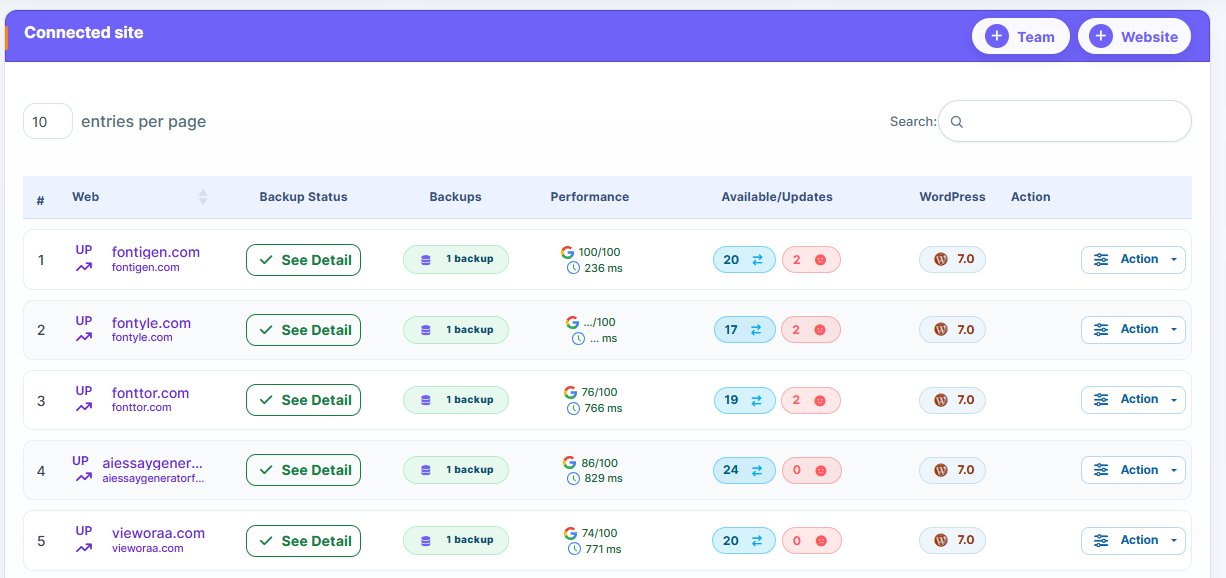
Let’s face it: managing and backing up multiple WordPress websites can make one’s day-to-day admin job more demanding. It’s easier when managing a single website manually. But as the number increases, the need for a centralized WordPress backup tool becomes more obvious.
Logging into each website’s dashboard (when managing multiple websites) to back up, update, and monitor uptime can feel overwhelming when done manually. You can even make costly mistakes during the process.
That is where platforms like WP Managify, which offer centralized dashboards for WordPress backup and management, come in. Want to know why you need such centralized platforms? Keep reading to learn more!
What Is A Centralized WordPress Backup Tool?
Centralized WordPress backup tools are platforms that let you back up, restore, and manage multiple websites from a single dashboard. They automate and centralize WordPress backup and maintenance, making it easier for agencies, freelancers, and businesses to manage multiple WordPress websites.
The idea of centralized dashboards is to enable agencies, freelancers, and website owners to manage multiple websites with ease. If you run a WordPress agency, you’ll understand why such tools are a necessity.
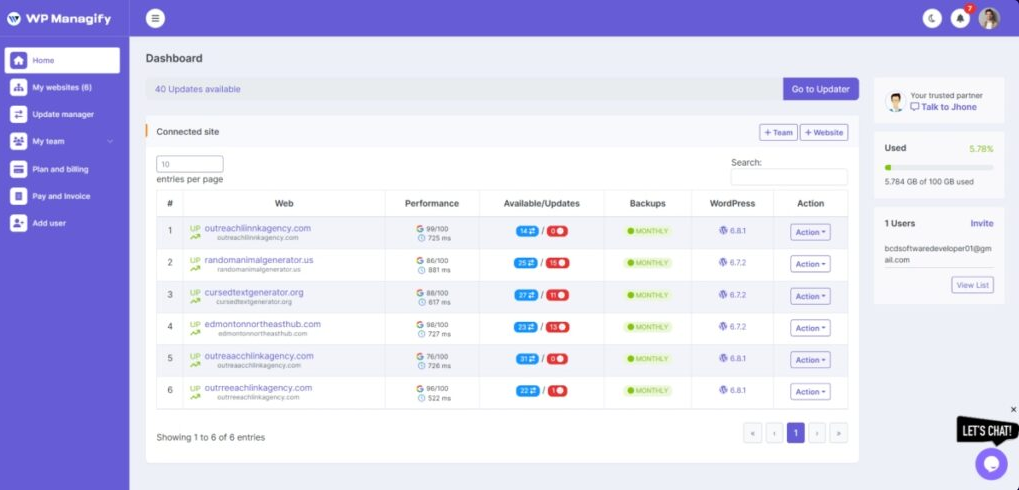
With a multi-site backup manager like WP Managify, you can add an unlimited number of WordPress websites. You can even increase your team size as your business grows.
With a centralized dashboard, WordPress management is a breeze. You don’t even have to log in to every website to back up, restore, or monitor uptime. You can do everything from a single dashboard. That’s what a “centralized backup dashboard is.”
Who Needs a Multi-site Backup Manager?
If you fall into the category below, you need a tool that can let you comfortably manage WordPress backups from a single dashboard.
Those who manage more than one WordPress website:
Managing a single WordPress website is a breeze, provided you have the time and can keep up with the daily admin routines. Your admin job becomes more draining as the number of WordPress websites under your supervision increases.
It doesn’t matter whether it’s your WordPress website or your clients’; you need to manage them properly. Your clients don’t care how many websites are under your care. You take full responsibility for their websites from the moment you agree to manage them.
Having a centralized backup and management platform will make your job of backing up, restoring, and managing multiple WordPress websites simple and effective.
You can even monitor each website’s uptime and health status, in addition to regular backups. That’s what advanced centralized dashboards do. Using such platforms can be an added advantage to your agency. You could let clients know you monitor uptime and website health, and that you run regular backups. This could persuade them to choose your WordPress management services over your competitors.’
The bottom line is, you need a centralized website backup platform if you manage multiple WordPress websites. It will make your admin job a breeze.
Those who occasionally miss important backups or updates:
Missing an important update or backup is a huge security risk. You’re putting your clients’ websites at risk by doing so.
Regular backup ensures your clients’ website data is always protected. You can restore your clients’ websites to their previous states in the event of an accidental deletion, cyberattack, or corrupt data.
There is a high possibility of missing backups or updates when managing multiple websites manually. It’s not easy to log into each website’s dashboard to update plugins or backups.
A centralized WordPress management dashboard makes it easier for you to manage multiple websites from one dashboard—no need to log in to each website separately.
Centralized dashboards boast advanced features that let you automate backups. Like on WP Managify and other similar tools, you can automate backup to run effortlessly. You can schedule backups to run daily, weekly, or monthly. Just set it once, and the WordPress management tool will handle the rest.
With automated backup, you won’t miss any backup. It’s the same thing with plugin and core updates. It doesn’t matter the number of websites you’re managing.
Those who invest so much time doing repetitive administrative tasks:
You can automate several admin tasks you do repetitively if you have a centralized WordPress dashboard with automation capabilities. You can automate backups so they run without human intervention.
The only task you need to do is connect the websites you want to back up and manage to the centralized dashboard. Then set the backup schedule. And that’s it; the platform backs up your website at the scheduled time and hour, even if you aren’t logged in.
If you have been handling several WordPress management tasks repeatedly, such as logging into different websites daily, you need a centralized dashboard.
Instead of logging into hundreds of websites to handle your daily admin, you only need to log in to a centralized dashboard that connects all your websites. You can back up, restore, update plugins, and monitor the uptime of all connected websites from a single dashboard.
Those who desire better control:
Another category of people who need a centralized WordPress backup tool are those who long for better control over the many WordPress websites they manage. With a centralized dashboard, you can see which website’s plugin needs updating, automate your backup, restore, and even monitor uptime.
You don’t need to log in to an individual website. Just log in to your central dashboard, and you’ll see which websites require attention.
You run a WordPress management agency (you’re a freelancer or developer):
The WordPress management service business is highly competitive. You need to consistently deliver results to gain trust, more patronage, and recommendations. You can only get recommendations and repeat patronage from satisfied clients.
Using a centralized dashboard will not only make it easier for your agency to manage multiple WordPress websites but also ensure compliance with regulatory requirements. You can scale and generate more revenue for your coffers. Additionally, you’ll be able to manage your clients’ websites efficiently, earn their trust, and get good recommendations.
If you run an agency that manages WordPress websites, you need a centralized backup and WordPress maintenance dashboard.
You won’t have to hire more staff as your website management tasks increase. You can add and manage an unlimited number of websites on the centralized WordPress management platform.
Why You Should Use a Centralized WordPress Backup Dashboard For All Your WordPress Clients
We have discussed the category of people who require a centralized WordPress backup tool. Now, let’s discuss the benefits of having such tools.
Why should you bother about getting a centralized backup dashboard? Here are the reasons:
Huge time-saving process:
How is using a centralized backup dashboard time-saving? Now, picture this scenario: imagine having a daily routine that involves logging into each WordPress website.
You must log in to each website daily to create backups, perform updates, plugin installations, and check each website’s status. With 5 websites, such tasks would be highly demanding and tiring. With 10 or more, they become unmanageable.
The solution is simple: get a WordPress management platform with a centralized dashboard. From the dashboard, you can connect up to 10 websites or an unlimited number. In just one click, you can initiate updates, install plugins, and learn about each website’s status.
Instead of logging into each website individually, you only need to log in to a centralized dashboard that connects to all your websites. This will save you time and energy.
You can channel the reclaimed time to other aspects of your business. Use the saved time to acquire more clients or develop more winning strategies for your business. You can accomplish much as a WordPress management agency daily.
With a multi-site backup manager, you can create backups for multiple websites simultaneously. This helps prevent surprises. When hackers strike, you’ll have a good restore point.
Better security for all your clients’ WordPress websites:
Security is a significant concern for WordPress websites. Tens of thousands of WordPress websites are targeted daily. A report shows 13,000 to 30,000 of those attacks end up being successful.
You don’t want your clients’ websites to be among the websites successfully hacked. It’s a demoralizing and shameful record to have. But you can prevent that.
How? You can keep hackers at bay by using a centralized dashboard.
Hackers look for loopholes in every website they pounce on. They look for websites with outdated WordPress core versions, plugins, themes, and other vulnerabilities.
A centralized dashboard will not only alert you to vulnerabilities in your themes and plugins, but will enable you to initiate critical security updates across all websites simultaneously. You will always be a step ahead of hackers.
Additionally, you can monitor each website’s uptime and health status in real time. This helps you identify and resolve security threats and vulnerabilities before they become serious.
Efficiency in backing up multiple websites:
Backups are the spines of every website. Without proper backup, a once-thriving website can cease to exist when hackers strike or other critical issues arise.
Backing up a single WordPress website is easy, though it’s also an error-prone process. The workload increases as the number of websites grows. Configuring, managing, and monitoring backups for multiple websites is highly taxing. It’s also an error-prone process.
The solution is to start using a centralized dashboard. You can back up multiple websites with ease without supervision. Most centralized systems allow you to set up automatic backups and schedules. You can schedule backups to occur daily, weekly, or monthly.
With most centralized systems, your backups are stored safely in the cloud. Additionally, you can restore backups whenever needed. It’s that simple and quick.
Most centralized systems even allow you to back up and restore a specific section of your website. For instance, you can restore databases or files. You can fix only the specific issue, without affecting the rest of your site.
Efficient monitoring of website statuses:
Many businesses have lost several revenue-generating opportunities and clients, and have damaged their reputations, due to prolonged downtime.
The longer the downtime, the more opportunities businesses lose. You lose opportunities, potential, and existing customers’ trust.
Without an uptime monitoring system in place, you won’t know which website is experiencing downtime. You won’t know until the client whose website you’re managing draws your attention to it.
Having your client notify you that their website is experiencing downtime is never a good thing. Such clients will likely end the contract or choose another WordPress management agency. You’ll even get a negative review, which could dent your image.
Most centralized systems, like WP Managify, offer 24/7 uptime monitoring. They help notify you when your website is experiencing a problem. That way, you can react quickly and fix the problem before the owner of the websites you’re managing figures it out.
Detect problems early enough:
Issues on a website don’t develop out of the blue. However, they don’t always start big.
You’ll mainly spot problems on a website as minor inconsistencies. But things can get out of hand when you don’t react quickly. Those minor problems you’re seeing can become critical over time.
Checking the health statuses of multiple websites manually is doable. But it can drain your energy and take time. You could miss some health issues on some of your websites, which could become critical.
The solution is simple: use a centralized dashboard.
Most centralized systems help monitor the health statuses of websites, alerting you quickly when something feels off. They can detect PHP errors, SSL certificate issues, outdated plugins, or non-recommended configurations, allowing you to address the problems.
Scalability for your agency:
As your client portfolio grows bigger, manual WordPress website backup and management become unsustainable. What worked smoothly for 10–15 websites might not work for hundreds or more. You will need a better way to manage more websites as your client portfolio grows.
You need a centralized WordPress backup platform if you manage many websites. Centralized systems are designed to scale with your business. You can manage an unlimited number of websites without changing the structure or employing more staff. Just add the websites, and automate the backup process. It’s that simple and effective.
The ease of scaling with a centralized system makes it a necessity for businesses looking to increase their revenue. Centralized systems are less error-prone when backing up websites. Thus, you won’t lose reputation or a client because of simple errors. The system makes backing up and managing multiple WordPress websites so easy.
Makes WordPress management cost-effective for agencies:
Imagine having hundreds of websites to back up and manage. And you’re managing them manually. The only way you can do the job satisfactorily is by hiring more staff. You’ll even need more staff as your client portfolio grows.
This business model is unsustainable. You can’t keep hiring more staff and using almost every dollar your company generates to pay salaries. Many businesses have packed up doing this.
You can run a highly profitable WordPress management agency with a centralized system. You can back up and manage an unlimited number of WordPress websites via a centralized system. You don’t even need to switch tools. However, you can switch to higher plans as your backup storage needs increase.
A single staff member can back up hundreds of WordPress websites through a centralized system. Centralized systems like WP Managify even offer one-click restore, allowing users to restore their entire website or a portion of it with a single click.
One-click backup, restore, and update:
Using a centralized dashboard to manage multiple websites makes backups, restores, and updates a breeze. You only need to connect each website to the centralized platform individually. The platform handles the rest after your manual effort.
Most centralized dashboards even include a one-click restore feature, letting you restore backups across multiple websites with a single click. You can even initiate updates across multiple websites with one click. You don’t have to log in to each website individually.
Unified backup and maintenance:
You don’t need to log in to each website’s dashboard individually. A centralized dashboard brings all your websites in one place. Thus, you can back up, restore, and perform your routine WordPress maintenance tasks with a single click from a single dashboard.
This saves you the hassle of logging into each WordPress dashboard one after the other and even of missing essential updates. A centralized dashboard empowers your team to work smarter and more efficiently.
Manage users across sites:
Most centralized systems, like WP Managify, allow you to add unlimited team members, not just websites. You can add or remove team members and assign roles with ease.
This feature makes using a centralized WordPress dashboard more desirable for agencies, freelancers, and developers managing multiple websites. It helps ensure you onboard the ideal number of team members to back up and maintain your clients’ websites.
The Problem with Managing Many WordPress Websites Manually
Are you a developer, freelancer, or agency managing multiple WordPress websites manually? You’re probably facing the following challenges:
Logging in and out of multiple WordPress dashboards daily:
You have staff handling the manual WordPress backup. They log in and out of multiple WordPress dashboards daily (in fact, several times a day) to back up, monitor uptime and updates, install plugins, and do other tasks.
Your staff won’t complain because they’re being paid to do the task. But these things can easily lead to burnout. It’s like climbing Kilimanjaro back and forth each day.
It’s draining mentally and physically to manage multiple WordPress websites manually. It’s not easy to enter different passwords to gain access to each dashboard daily. Your employees have a problem with this WordPress management strategy. They aren’t just bold enough to speak their minds.
Missing critical updates and security patches:
Security is top of the agenda of every WordPress management strategy. The reason for backing up and managing WordPress websites is for security.
Hackers are always lurking around, seeking loopholes to gain access to your website. They are looking for outdated themes, plugins, and WordPress core. These are the places they find loopholes to gain control of websites.
Manually backing up and updating multiple websites will leave them vulnerable to security threats. Hackers can strike a website before your team even has time to log in to back up or initiate relevant updates.
Your team might even forget to back up or update some of the websites, leaving them vulnerable to security threats. It is highly likely to happen when you manage multiple websites manually.
Forgetting the login details for some of the websites:
Imagine managing 15 websites daily as your client portfolio grows. You will likely forget your login details for some websites a few times. You might not remember which login details are meant for a specific WordPress website.
Reaching out to your client to confirm the login details after the initial confirmation may be unprofessional. The client might feel that you haven’t been managing their websites.
You won’t have such a problem with a centralized system. You only need to log in to one centralized dashboard to back up and manage multiple WordPress websites.
An error-prone process:
One problem with manual backups is their error-proneness. No matter how careful you are, you will make mistakes when managing multiple WordPress websites manually.
Conclusion
You don’t need to break a sweat when managing all your clients’ WordPress websites. You don’t even need a large team to manage hundreds of websites.
With a centralized WordPress backup tool, you can efficiently back up hundreds of websites with just one click. You can automate backups and set schedules. You can schedule a backup daily, weekly, or monthly.
Switching to a centralized system is an essential step for agencies, freelancers, and developers. You can scale your business effortlessly and generate more revenue with a small team.
FAQ’s
What platform offers the best centralized dashboard for WordPress backup?
There is a long list of centralized WordPress backup tools. However, WP Managify, ManageWP, MainWP, and WP Foundry are among the top-rated options.
Most agencies and developers prefer WP Managify. Aside from backing up WordPress websites, it also supports uptime and website health monitoring, as well as reporting.
Is WP Managify’s centralized WordPress backup dashboard ideal for beginners?
Yes, it is. It boasts a user-friendly interface and support resources that make it easy for beginners. You also don’t need to be tech-savvy to use the tool for your website backup. Just connect your website and automate maintenance, including backup. You can automate backup and initiate updates across all connected websites from a single dashboard. That’s how effective having a centralized dashboard can be.
Can I use a free centralized WordPress backup tool?
Yes, you can use most centralized backup systems for free. WP Managify, for instance, offers free and paid plans—no free trial. However, keep in mind that the free plan has some limitations. You can only store your backups for a certain days, and you have limited storage space. Upgrade to the pro plan if you wish to back up large files or more websites.
How secure are centralized backup tools?
They are highly secured. Most centralized systems store backups in the cloud, provide encryption, regularly scan for malware, and update to address security vulnerabilities.
When using a centralized dashboard, always ensure your password is strong enough. Using a weak password or sharing your password with the wrong person can put your clients’ websites in real danger.
The hackers obviously can’t enter any of your clients’ websites via the centralized dashboard, but can delay critical updates long enough to strike.
Is using a centralized backup dashboard more expensive than a manual process?
You can’t compare using a centralized system to manual WordPress maintenance. Both processes are worlds apart in terms of cost, efficiency, and scalability.
Using a centralized dashboard is way more cost-effective. You can manage more websites and scale easily. You don’t need a large team to manage hundreds of WordPress websites. WordPress maintenance jobs are also a breeze when you’re managing multiple websites from one dashboard.