
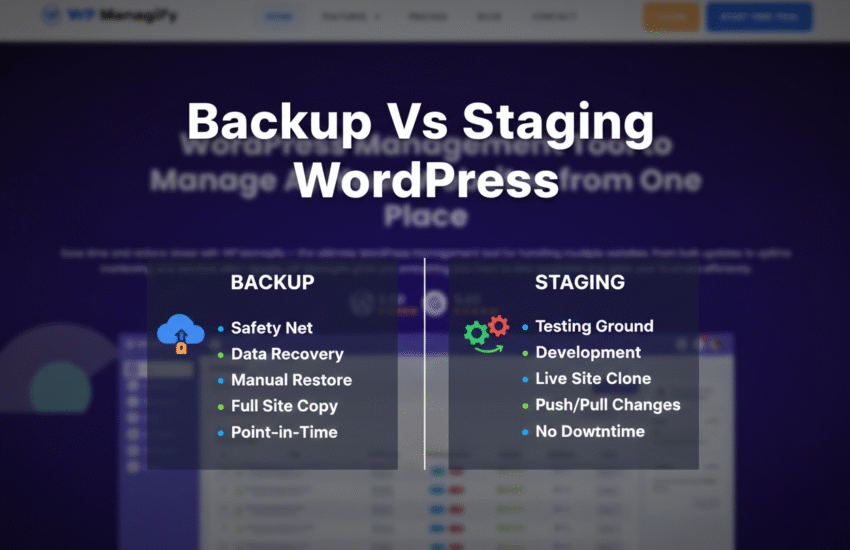
Having a good understanding of the meaning and when to use backup vs staging WordPress sites is crucial for effective website management. Both processes are essential for your WordPress website’s security and smooth operation.
You can back up your live website using various methods. One of them is via a centralized system like WP Managify. You can equally use a plugin or do it manually.
Here, we’ll answer the popular question, “When should I use staging or backup?” What are their meanings, and why are both processes critical? Keep reading to know more!
What Backup vs Staging WordPress Website Means
We’re going to discuss the meaning of WordPress backup and staging, including the importance of both processes in WordPress management.
Let’s begin with the WordPress backup.
What is WordPress backup?
WordPress website backup involves creating a separate copy of the entire WordPress website. Backups serve as a website’s safety net, allowing it to be restored to a previous working state after data loss, a crash, a failed update, or a cyberattack.
Backing up an entire WordPress website involves creating an entire copy of the website. These include the WordPress core files, plugins, themes, media, and database. The database includes your posts and settings, including user data.
So there are two components of a website that you backup – the files and the database. The files make up a website’s static structure, including its appearance.
The database, on the other hand, stores and manages the website’s dynamic content, including user information.
A full backup includes creating copies of a website’s files and database. However, you can choose to back up only the database or file (or both). Most tools like WP Managify for WordPress backup support selective backups, making it easier for WordPress professionals to restore only a portion of their website when needed.
What is a staging website?
A staging website, its process, and concept differ entirely from a website backup. You can liken it to a rehearsal stage, where you make all the necessary controlled adjustments and observations to ensure everything is working fine before showing it to the audience.
In a rehearsal stage, you don’t have spectators; no audience, just the trainer and the trainee. You can try different costumes, positioning, and everything. You’re allowed to make mistakes and corrections at this stage. There’s no audience to judge you.
This same analogy applies to a staging website. You can test plugins, new updates, and even layouts on the staging website before deploying them to your live website.
Since the staging website isn’t your live website and doesn’t get visitors, you won’t have to worry about messing up the user experience or hampering your website’s ranking.
The staging website lets you spot and address problems more quickly, so they don’t spiral into your live website. It helps you prevent problems that can cause disruptions and downtime for your live website.
For instance, you can spot plugins with compatibility issues and take decisive actions. The staging website provides a testing environment where you can test anything before introducing it to your live website.
Can a staging website impact my live website’s search engine ranking?
No, it won’t, despite it being a cloned copy of your original website. It’s a clone; thus, it doesn’t get traffic. Search engine bots don’t even know you have such websites, since they’re hidden away from them.
Only you, your admin, or your developer knows that your live website has a clone.
When Should I Use Staging or Backup?
Understanding when to use backup vs staging is paramount to your website’s smooth operation. Both processes serve different purposes.
When should you use a backup?
- You can use a backup before running an update or any significant action on your website. The reason is to ensure you can restore your website to its previous state should the update fail.
- Backup after every significant action or change on your website. Have copies of the changes you made, so they won’t get lost if your website suddenly crashes.
- Backup to keep customer orders, purchase history, profiles, payment history, cart, product pages, shipping information, and other important information on your WooCommerce store intact.
When you back up occasionally, you can easily restore your website to a previous date before an update or after a cyberattack, accidental data loss, a failed update, compatibility issues, or corrupt data. You can restore your website with ease, no matter the level of damage created.
Pro Tip: Regular backup is crucial for WooCommerce stores. High-activity websites require regular backup. You can set up an incremental backup for your WooCommerce store, since you can’t run full backup on a daily basis.
Backing up a WordPress website shouldn’t feel like a chore anymore with advanced tools like WP Managify and a host of others. You can automate backup and choose your schedule. You can schedule backup to run daily, weekly, or monthly (set custom schedule), depending on your website’s activity level.
When should I use a staging website?
There’s a reason staging websites are crucial. They let you test changes you want to apply to your live website in an isolated environment.
You can test themes, plugins, backups, updates, and other new features in a staging website before deploying them to your live website.
Here’s when you should consider using a staging website:
- Before deploying a new code to your live website.
- Before implementing any update on your live website.
- Before installing any plugin on your live website.
Pro Tip: Testing plugins in an isolated environment before deployment helps you identify compatibility issues earlier so you don’t use the same plugin on your live website.
- Before deploying any theme on your live website.
- Occasionally, use the staging website to test backups. That way, you’ll know if restoring would be successful when the need to use the backups arises.
Staging vs Backup WordPress Comparison: Differences and similarities
Let’s talk about the similarities before the differences. How are staging and backup similar?
The similarity lies in the idea behind both concepts: ensuring the security and smooth operation of a website.
A website that experiences downtime too often and for long periods will rank lower. The website will have little to no organic traffic and generate low sales (for those running WooCommerce stores).
You can test anything you wish to deploy on your live or staging website. That way, if anything goes wrong, your live website won’t be affected. It will continue functioning properly.
In the same vein, backups help you create copies of your entire website or of a portion of it. They serve as your website’s insurance policy, making recovery a breeze when a failed update, cyber attack, data loss, or compatibility issues emerge.
Both backup and staging serve one purpose – to prevent lengthy downtime.
When you back up regularly, you can restore your website to the last backup with ease.
With staging, you have an environment to test changes, updates, and code before implementing them on your live website.
In a nutshell, both backup and staging help you avoid lengthy downtime. They ensure your website functions smoothly around the clock.
We have discussed the similarity between backup and staging. Now, let’s discuss the differences.
The table below highlights the differences between the staging website and the backup.
| Backup | Staging | |
| Meaning | Create and store complete copies of a website (files and databases) | An isolated environment for testing updates, changes, and code, including backups before deploying them to the live website. |
| Purpose | To restore your website to its previous state or last update after a failed update, a cyberattack, data loss, corrupt data, etc. The purpose is to make website restoration easy. | Test codes, updates, themes, plugins, and backups in a risk-free environment. The purpose is to spot issues early on before applying the changes to the live website. |
| Function | Creates a complete backup (files and database) of a live website | Clones your live site (files and database) into a separate (private) URL. Search engines won’t know it exists. |
| Lifespan | Short or long (depends on the storage duration of the backup tool and the storage space) | Short (usually deleted after implementing changes on the live website) |
| Usage | Used for storing | For testing and developing |
| Environment | Files on storage | A live but private (separate) website with a private URL |
While backups help fix issues with a website after they happen (ensure you can restore your website to its previous state), staging acts proactively and differently.
With a staging website, you identify problems and fix them before implementing changes (updates, new code, and themes) on your live website.
Must-know Dangers of not using WordPress Staging vs Backup (When You Should Use Them)
WordPress Backup and the use of a staging website are two crucial processes that website users must take seriously.
Why is backup so important? Hackers can strike at any second. And when they do, you can only recover the portion of your website you backed up. That’s why regular, adequate backups are essential.
Using a staging environment is equally important, too. The risk of implementing new changes, updates, themes, and codes on a website without testing is high.
Here are problems that can result when you fail to back up your website.
Dangers of not creating backups:
Irreversible data loss:
You risk permanent data loss if you fail to back up your website. When hackers strike, updates fail, data corruption occurs, or you accidentally delete your posts, images, or pages, they are gone forever.
Lengthy downtime:
Backup makes website restoration quick and easy. Most centralized backup platforms even offer one-click restore, minimizing downtime.
Unfortunately, when you fail to back up, there is a high likelihood your website will experience lengthy downtime if hackers strike or other issues occur.
Troubleshooting or manually rebuilding a broken website’s content can take time and drain your energy. In most cases, it could take hours, days, or even weeks.
Significant revenue losses (risk of business closure):
Failure to back up can result in prolonged downtime while you try to resolve the issue. That means your customers can access your product pages or place orders.
For a WooCommerce store or a business that depends on the website to generate leads and sales, extended downtime can result in significant revenue loss. Business closure is inevitable in these circumstances.
Costly security breach:
Hackers are always looking for websites with loopholes to strike daily. Thousands of WordPress websites get hacked daily.
Having backups is like your digital insurance policy. You can easily restore your website to a cleaner version whenever you encounter a ransomware or malware attack.
Without backup, the only two ways you can restore a website with ransomware or malware are to negotiate and pay the hackers what they want. You aren’t even certain of recovering your website data after payment.
You can manually clean a website infected with ransomware or malware, but that would cost you the time and expense of hiring an expert. A well-planned-out automated backup strategy would have saved you all the stress and financial losses.
Google penalty:
Your website’s lengthy downtime will attract Google for the wrong reasons. The search engine giant could blacklist or penalize your website if it stays down for an extended period.
No one wants to experience Google’s penalties or blacklisting. It will damage your website’s visibility and ranking, which you have invested so much time and money in.
Damage your brand reputation:
Allowing your website to experience extended downtime isn’t a wise business decision. New and existing customers will lose interest in your brand if your website remains inaccessible or compromised for an extended period.
Trust is one of the currencies that drive business success. So, avoid doing things that will make customers start doubting your brand.
Customers can start thinking you’re an unserious brand if your website stays inaccessible for long periods. And no genuine customer would like to patronize a business with a questionable reputation.
Issues migrating website:
Backup makes migrating from one domain or hosting provider to another smooth. But when you don’t back up, then the process can be really complicated and error-prone.
We have discussed the problems that can arise when you fail to back up your website.
Now, let’s discuss the problems you could face if you fail to use a staging website.
Dangers of not using a staging website:
Unexpected downtime:
Leaving your website inaccessible for an extended period can significantly impact your business’s reputation and revenue. Your customers will think you aren’t a serious business.
A simple plugin or theme update can cause site downtime. Using a staging environment for testing is the only way to know whether a plugin or theme update will break your website.
Fixing such critical errors can range from renaming the plugin folder to manually reactivating the plugins. However, this process can be time-consuming and disrupt the site’s user experience. You stand to lose more organic traffic and business opportunities following your site’s extended downtime.
Significant data loss:
You risk significant data loss or corruption when you make minor or major changes to your live website without testing them on a staging site first. Whether you’re changing a theme, updating a plugin, or WordPress core, you could make mistakes in the process.
Testing updates or changes on a staging environment before implementing them on a live website will help you prevent data loss. You’ll know what works and what doesn’t courtesy of the test conducted.
High cost of fixing a damaged website:
If you aren’t using staging websites, be ready for expensive repairs.
There’s a common saying that prevention is better than a cure. In this case, using a staging website to test is better than ignoring it. A straightforward update or change made on your live website can create problems that require hiring an expert website developer to fix.
Developers don’t charge meager fees these days. They never did. In most cases, you’ll end up making expensive repairs due to critical errors caused by your failure to use a staging site.
Pro Tip: It costs little or nothing to create a staging website. Fixing a broken live website is way more expensive.
Lose potential customers and trust:
Imagine trying to purchase a product from a website. You’re about to complete the order when an error message pops up, and the site becomes inaccessible.
Will you continue trying, waiting, or leave the website immediately? Put yourself in your customers’ shoes. Will you rush to a competitor or keep coming back to the crashed website to try and complete the order? You clearly wouldn’t do so.
Customers will abandon a website that displays an error message or prevents them from completing their purchases. And you could lose such customers permanently.
No amount of follow-up can change the mind of a customer who doesn’t consider your business trustworthy.
Irreversible website damage:
Minor updates or changes to a live website can cause errors that permanently damage it. Your only saving grace when this happens is your backup, provided you have one.
If you had tried the updates or changes on a staging website before implementing them on a live website, you could have spotted the errors and taken the right step to address them.
Benefits of Creating a Backup vs Staging Site Usage
The dangers of not backing up your website or testing changes and updates on a staging site before applying to your live website should convince you to make a U-turn.
Here are the benefits of creating backups and using staging websites. Let’s start with the benefits of regular backup.
Benefits of backup:
Instant website recovery:
In the event of an update failure, a cyber attack, a PHP timeout, or compatibility issues, backups make restoration a breeze. You can easily restore your website to its previous state or to the last backup when everything was working perfectly.
Reduces downtime:
Regular, adequate backups reduce or eliminate downtime. You can restore your website to its previous state instantly whenever things go wrong. Most WordPress management tools like WP Managify even support one-click restore and monitor uptime, including site health.
Avoid costly repairs:
With proper backup, you won’t have to make costly repairs. Even if hackers strike or other critical errors crash your website, you can restore WordPress from backup with one click.
Improve website security:
Regular backup improves your website security. It lets you run your business with confidence, knowing that nothing can stop you from operating online.
With hackers always busy exploring ways to hack websites, your backups are an essential safety net to get your website back online whenever you get hit by cyber criminals.
Improves business reputation:
While customers won’t patronize you because you back up regularly, you can benefit from regular backup in other ways. Regular backups ensure your website remains accessible to potential customers. That means visitors won’t struggle to start and complete their orders.
Pro Tip: Google rates websites that deliver a positive user experience highly. While UX (user experience) isn’t a direct ranking factor, it can send a positive signal that influences search rankings.
Customers who had a positive experience shopping on your website would like to return. Over time, they become loyal customers, giving feedback and recommendations that attract others to your business.
Prevent revenue loss:
Businesses lose revenue via different channels. It can happen through expensive, avoidable repairs or irreparable damage. Building a website from scratch is expensive and time-consuming. That’s why proper backup is highly beneficial. You won’t have to initiate costly repairs; one click is all you need to restore from backup.
Extended downtime can cause significant revenue loss. Regular backup will help you prevent lengthy downtime. That also means you won’t miss out on revenue-generating opportunities.
Benefits of using a staging website:
Safe place to test plugins, themes, core updates, and backups to ensure there are no hiccups before applying to the live website.
A safe place to debug WordPress errors without messing up the live website.
A remote staging environment allows multiple users, team members, and developers to collaborate seamlessly on meaningful WordPress projects. When things get messy, they can delete the staging site and create a new one for the project.
You can create a staging website to let your clients experience how the final output would look and get their approval before presenting the live website. Give your clients a firsthand experience of how the live website would look by creating a staging site. It speeds up WordPress projects and client approvals.
FAQs
What are the cons of using a staging website for WordPress?
While staging environments have their pros, they equally have cons.
- Staging functionality isn’t always free to access.
- Website updates can take longer, particularly when testing every change you make. The bigger the update, the longer the testing period.
The pros of using staging websites far outweigh the cons. Using a staging website to test updates, changes, and backups will help protect your live website from disruption.
Will a staging website affect my live website’s search engine ranking?
No, your staging website won’t have any impact on your live website’s ranking or search engine optimization (SEO). However, you must get the configuration right.
Endeavor to hide the staging website from search engines. The essence is to prevent them from indexing your website and treating it as duplicate content.
You can password-protect your staging website to prevent search engines from indexing it. You can equally block crawlers from crawling and indexing your staging website with the robots.txt file.
You can find hosting providers and even staging plugins that automatically handle this for you. The configuration aims to keep your website copy hidden, while the live one is visible to search engines.
Should I always test updates on the staging website before applying them to the live website?
Yes, test your updates before applying them to your live website. Test your active themes, WordPress core files, plugins, and even backups before you apply them to your live website.
The reason for testing updates first on a live website is to catch bugs or compatibility issues that might disrupt it. If there are bugs or compatibility issues, you can fix them and know whether applying the update to your live website is worthwhile.
Should I delete the staging website once testing is completed?
Yes, go ahead and delete the staging site once you finish testing. This process is essential because it helps reduce hosting costs, particularly if you’re using a hosting provider that charges extra for a staging site.
Deleting the staging site will equally free up server resources. You must delete your staging site once the testing is complete.
Is a backup the same as a staging website?
No, backup and staging aren’t the same. Backup means creating complete copies of your website for seamless restoration when needed.
On the other hand, a staging site is a cloned version of your live website. The idea of a staging site is for testing updates, WordPress core files, theme changes, and backups before you apply them to your live website.
Between backup vs staging, which is more important?
Both are important. Without backup, you risk losing your website. A ransomware attack, malware, data corruption, or a compatibility issue can ruin your website. Hackers can hold you hostage once they take over your website, and even demand a massive fee to let go.
So, backups improve your website’s security. No matter what happens to your website, having a backup ensures you can restore it to a previous working state without stress.
The staging site is equally important. You’ll have the opportunity to test every update and change to identify bugs and compatibility issues before applying it to your live website. The test will help to expose what works, so you can take precautionary measures when performing the same update on your live website.
Will the deleted staging site affect my live website’s functionality?
No, it won’t. The staging environment is a cloned version of your live website. However, remember to back up your live website before you delete the staging site.
Backing up your website data will protect it in case you need to make changes later. You can also consider keeping the staging site if you plan to test more updates, backups, and themes in the near future.
Can clients have access to the staging site for review?
Yes, clients can have access to the staging website. That way, they can review the site and provide feedback so you can adjust it to their satisfaction.
Because the staging website is separate from your live website, clients can even make some inputs on the site. They can test different features and designs to know which is most ideal before reflecting those changes on the live website.
Sharing login details with clients not only makes the job easier but also helps you build strong relationships with them. And because they participated in the design on the staging site from start to finish, approval of the live website will be quick and easy.
Conclusion
Understanding the differences between backup vs staging WordPress sites, including what to use and when, is essential for efficient WordPress management. Both processes are critical for website security and performance.
An effective backup strategy will always keep you a step ahead of hackers or disruptive updates. Even when hackers strike or a bad update disrupts your website, you can restore it with one click from backups. Platforms like WP Managify support the one-click restore.
The staging site is your website, but a cloned version of it. You can test updates, backups, WordPress core files, and designs before applying them to your live website.
Testing updates and changes before applying them to your live website is essential to identify bugs and compatibility issues that could disrupt it. So, backup and staging are two crucial processes that help keep your website safe and functional. Don’t skip either for any reason!

&media=https://wpmanagify.com/wp-content/uploads/2025/12/backup-vs-staging-wordpress.png)