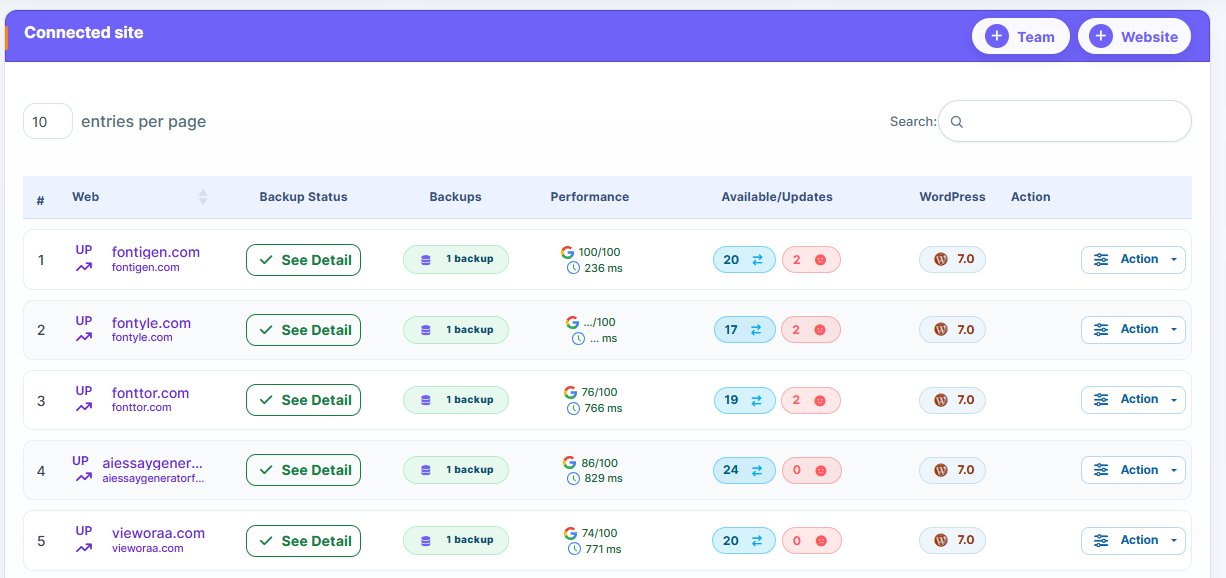
WordPress Maintenance Reporting Tool
Keep every website healthy, secure, and optimized with WP Managify’s WordPress
- Monitor website uptime, performance, and plugin updates
- Track security, backups, and site health automatically
- Share branded client maintenance reports with ease

Key Features of WordPress Maintenance Reporting Tool

- Real-Time WordPress Site Monitoring
Track uptime, downtime, and core update tracking effortlessly. WP Managify ensures you never miss critical website events.
- WordPress Health Check Dashboard
Access a unified dashboard that visualizes your site’s performance, backups, and plugin status in real time.
- Automated Website Maintenance Reports
Generate automated WordPress reporting for clients. Reports include uptime tracking, WordPress error tracking, and plugin update notifications.
- WordPress Security Scanning & Backup Monitoring
Keep websites protected with automated WordPress security scans and backup monitoring—ensuring every maintenance task is verified.
- Customizable WordPress Analytics Dashboard
Highlight site performance metrics, SEO results, and maintenance tasks that matter most for clients or your agency.
- Site Maintenance Schedule & Task Tracker
Plan recurring maintenance using a built-in maintenance task tracker. Schedule automatic checks and report deliveries at weekly or monthly intervals.
Benefits of Using WP Managify’s Maintenance Reporting Tool
Deliver professional, branded reports to clients effortlessly while showcasing your expertise.

Comprehensive Monitoring
Full visibility over uptime, updates, and performance metrics.

Automated Efficiency
Set automated reporting intervals and reduce manual tracking.

Client Transparency
Share clear, branded WordPress client reports to strengthen trust.

Agency Optimization
Manage multiple client sites and generate combined multi-site reports.
Data-Driven Insights
Access metrics through an intuitive WordPress analytics dashboard.
Why Choose WP Managify's Maintenance Reporting Tool
| Feature | WP Managify | Competitors |
|---|---|---|
|
Website Health Monitoring |
|
Limited |
|
WordPress Uptime Tracking |
|
|
|
Automated Maintenance Reports |
|
Manual |
|
Security & Backup Scanning |
|
Limited |
|
Multi-Site Reporting |
|
|
Trusted by Agencies & WordPress Professionals
Managing over 35,000+ websites, WP Managify is built to simplify maintenance, auditing, and client reporting.
How It Works
A step-by-step look at how WP Managify creates and delivers WordPress Maintenance Report.
- Connect WordPress Sites
Add client sites for instant uptime and health monitoring.
- Customize Dashboard & Branding
Apply logos, brand colors, and custom headers to reports.
- Select Metrics & KPIs
Include uptime, security scans, plugin updates, and performance analytics.
- Schedule Automated Reports
Define weekly, monthly, or custom reporting intervals.
- Export & Share Reports
Export PDF, CSV, or Excel reports to share with clients or internal teams.

Security & Compliance
GDPR-compliant maintenance data handling
Protect Client Data with GDPR-Compliant Maintenance Reporting.

Encrypted data storage and export
Keep Reports Secure with End-to-End Encryption.
Secure multi-user access for agencies
Enable Safe, Role-Based Access for Your Team.
Frequently Asked Questions
Quick answers to common questions about creating and delivering WordPress Maintenance Report with WP Managify.
It includes uptime tracking, plugin update notifications, security scanning, backup monitoring, and detailed performance analytics.
Yes, WP Managify supports multi-site maintenance reporting for agencies managing multiple clients.
Absolutely. You can create automated maintenance reports scheduled daily, weekly, or monthly.
Yes, you can add your logo, color palette, and headers/footers for WordPress client maintenance reports.
Yes, WP Managify provides plugin update notifications and core update tracking within the same dashboard.
It shows uptime, errors, performance metrics, security status, and backup activity.
Yes, it’s designed for freelancers and agencies who need WordPress agency reporting tools for multiple clients.
Yes, both backup and WordPress security scanning data are automatically logged and reported.
Once scheduled, WP Managify generates reports automatically and stores them for export.
Yes, through WordPress activity logs and site audit reports, you can review historical maintenance events and performance.
Stay Ahead with Automated
WordPress Maintenance Reporting.
Monitor uptime, updates, and performance—automatically and effortlessly.